How to VLOOKUP Your Will to Live: A Beginner’s Guide
Let’s not pretend anyone enjoys Excel.
You don’t crack open a spreadsheet because life is bursting with meaning.
You open Excel the way a mid-century housewife opened gin at 2pm: quietly, with dread, and because someone just asked about KPIs again.
So today, we’re doing something useful with it.
We’re going to use Excel to find your will to live.
Specifically:
We’re going to VLOOKUP the part of you that died three budget cycles ago.
Step 1: Open Excel. Feel the Shame.
The second that green icon loads, you know you’ve lost.
There’s no serotonin here. Only #REF! errors, passive-aggressive tabs named “Final_Final_v7,” and one cell whispering:
“You’re not paid enough for this.”
Step 2: Input Your Lookup Value (a.k.a. “Hope”)
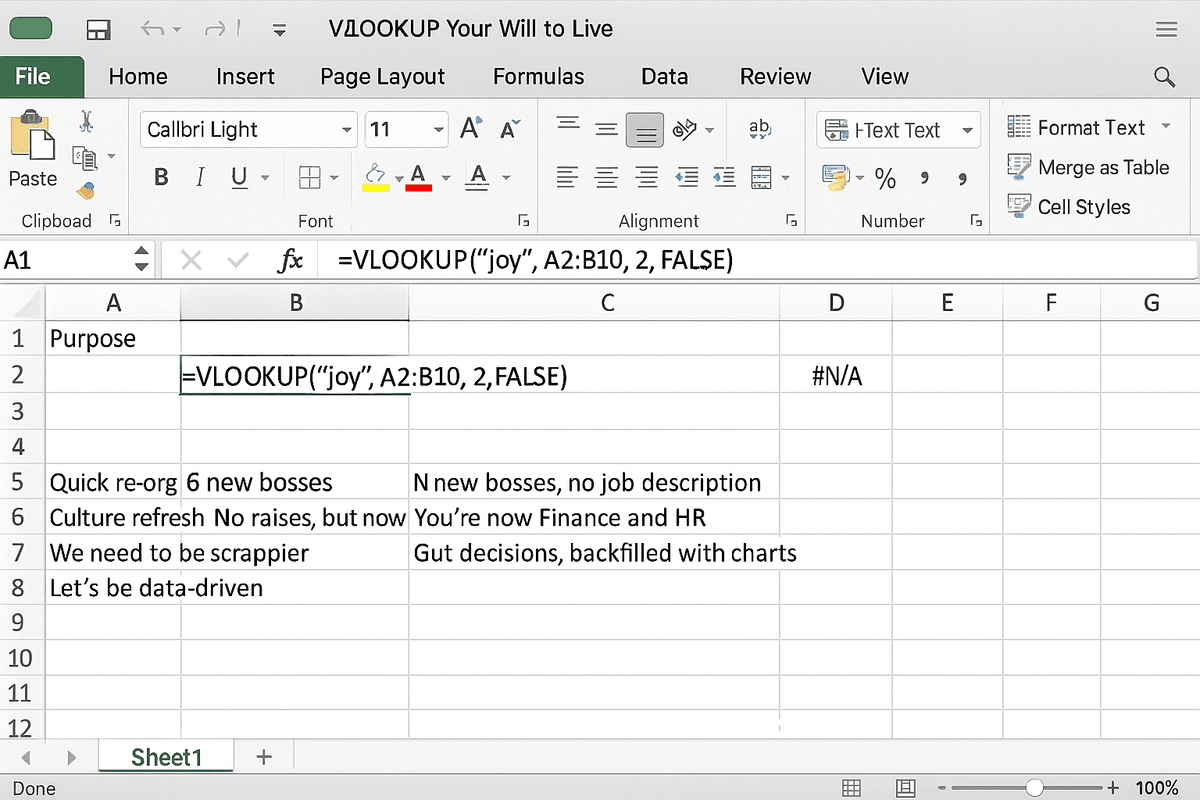
In cell A1, type something that used to bring you joy:
"Purpose""Quiet focus time""Being able to pee without Slack notifications"
Hit enter. Watch it stare back like a hostage with Stockholm syndrome.
Step 3: Build Your Table Array (The Corporate Trauma Index)
| Situation | Outcome |
|---|---|
| “Quick re-org” | 6 new bosses, no job description |
| “Culture refresh” | No raises, but now with murals |
| “We need to be scrappier” | You’re now Finance and HR |
| “Let’s be data-driven” | Gut decisions, backfilled with charts |
You’ve just built your first model of despair. Congratulations.
Step 4: Column Index Number (Choose the Flavor of Burnout)
Column 1 is what you signed up for.
Column 2 is what you actually do.
Column 3 is the quiet sound your soul makes when the Zoom call says “connecting…”
Pick a column. Any column. They all lead to therapy.
Step 5: Range Lookup (You Want the Ugly Truth, Not a Vibe)
Set this to FALSE, obviously.
We don’t approximate pain. We excavate it.
So your formula becomes:
=VLOOKUP("joy", A2:B20, 2, FALSE)
And Excel spits out: #N/A
Which is a deeply honest answer.
Step 6: Add Some IFERROR Logic (a.k.a. Emotional Buffering)
Protect yourself.
=IFERROR(VLOOKUP("meaning", A2:B20, 2, FALSE), "Apply to Patagonia")
Or, if you’re already broken in:
=IF(VLOOKUP("will_to_live", A2:B20, 2, FALSE)="", "Schedule fake dentist appointment", "Continue pretending")
Excel doesn’t judge.
It just enables.
Step 7: Conditional Formatting (Make the Breakdown Look Branded)
Now let’s add some color to the existential collapse:
- If cell contains “synergy” → fill red
- If column G > 80 hours → font color = white on white
- If Slack status = “offline” → mark row as emotionally stable
You’re not just formatting cells.
You’re crafting your suicide note in Helvetica.
Final Step: Add a Pivot Table of Regret
Create a new sheet.
- Rows: Years in this role
- Columns: Promises made by leadership
- Values: Broken dreams, summed
Filter by “Strategic Initiative.”
Cry.
Bonus Feature: Create a Dashboard for HR
Why not?
- KPI 1: “Time Since Last Joyful Moment”
- KPI 2: “Number of Passive-Aggressive Slide Edits”
- KPI 3: “Instances of ‘Let’s circle back’ causing psychic harm”
Then present it. Watch their eyes glaze over.
You just got yourself invited to another “Wellness” offsite with no actual PTO.
Epilogue: The Spreadsheet Was Always Honest
You came looking for your will to live.
You didn’t find it.
But in the process, you built a functioning model of your corporate disillusionment.
And for once, the math reflected reality.
Not the version you present at the board meeting.
The version where you’re Googling “espresso machine repair certification” at 1am because that seems less chaotic than one more headcount sync.
So no—VLOOKUP can’t restore your spirit.
But it can tell you where it got buried.
And maybe that’s enough to start digging.
Now save the file as “Q3_Operating_Plan.xlsx” and send it to leadership with a smile.
They’ll never open it.
Which is fine—neither will your therapist.